
Awststats not working/updating – cPanel
It can be caused due to many issues and here I am posting some fixes for that.First check permission of /usr/local/cpanel/3rdparty/bin/awstats.pl, it should be 755. Then to update awstats and…
It can be caused due to many issues and here I am posting some fixes for that.First check permission of /usr/local/cpanel/3rdparty/bin/awstats.pl, it should be 755. Then to update awstats and…
Add Route ======== Code: [Select] # route add default gw GATEWAY_IP eth0 Delete Route ========== Code: [Select] # route del default gw GATEWAY_IP Check Routing Table =============== Code: [Select] #…
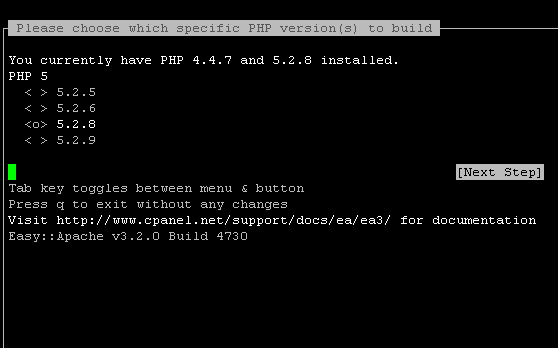
Method 1: Recompilation from WHM===========================1. Login to the WHM of the server as user root.2. Go to Software >> EasyApache (Apache Update) 3. Select a profile to load and click…

You may have come across this error before while trying to restore mysql databases, it can be easily fixed by increasing max_allowed_packet value. Check the current value first. Get into…
Find the following line in your web.config file : <httpRuntime maxRequestLength=”2097151″ waitChangeNotification=”1″ maxWaitChangeNotification=”3600″ /> Change it to: <httpRuntime requestValidationMode=”2.0″ maxRequestLength=”2097151″ waitChangeNotification=”1″ maxWaitChangeNotification=”3600″ /> Request Validation Mode property gets or sets…
Login to the server via SSH as user, then enter the command : # gem install rails -v=2.3.5 With -v option you can specify the rails version you want to…
To check if perl is working on a server: Open a test file, # vi test.pl And enter the following code : #!/usr/bin/perl print “Content-Type: text/htmlnn”; print “<html><body><h1>Perl is working!</h1></body></html>”;…
If you face issues in getting rewrite rules of your website to work, first check if mod_rewrite is installed/enabled. # httpd -l | grep rewrite If mod_rewrite is installed on…
It is a common issue with vBulletin. If you get 404 – page not found error in vBulletin, first try enabling RewriteBase within .htaccess file. In order to do so…
First check for any disable options for innodb in /etc/my.cnf like skip-innodb and remove them if there is any. Then restart mysql: If that doesn’t work, try # /etc/init.d/mysql stop…